Posts

Showing posts with the label linux

Ongoing Linux Cheatsheet

Image
Reference For Me, Reference For You? I often find myself using certain commands on semi-regular basis. Not regular enough to remember but enough to know what I am looking for. This is my list of snippets that others might find useful. I will do my best to update this from time to time. On a side note, I primarily use Ubuntu 18.04 (20.04 upgrade will likely happen when it comes out). I occasionally use distros other than Ubuntu but they are typically Debian based. Variables that you want to alter will be denoted as $VAR_NAME. Photo by Kevin Horvat on Unsplash Connecting To Wifi Using CLI - This uses the command line version of NetworkManager (nmcli) - Obviously you need to know your network name and password - Determine your network interface with ' nmcli device status '. Four columns will be displayed. Find wifi in the Type column and then the associated Device name is the interface name. Commands:  nmcli d wifi connect $NAME password $PASSWORD iface...

Linux and SSH for Noobs

Image
  Since starting grad school I have gained a whole new appreciation for linux. Ubuntu has been my primary OS since 8.04 (Hardy Heron) but I hadn't really looked much at how to really streamline and optimize my workflow until this year. At my university, all Windows computers run an antivirus program that kills performance. It runs ruthlessly and suck up a lot of computer resources. This has only reinforced my choice to use linux as the IT guys will not provide any support and will not install anything on your computer, thus allowing complete freedom. Not all workplaces may allow for this but it does make things much easier if they do. What is SSH? SSH is a cryptographic network protocol that allows for secure network operations over a non-secured network. What this means is that users have the ability to securely login to remote systems on almost any network. Why should I use it? I have known about SSH for years but never used it extensively. It has only been this year...

Linux and Multimedia Creation

Image
Audio Some of the earliest uses I found for my personal computers was recording audio. Though these recordings were generally low quality, in both content and equipment, I did get the "recording bug". For the first era of my creativity, I was stuck using the family computer. In order to record, I would have to lug my synthesizer over to the family computer or the family computer to my upright piano before I could begin. This made it tedious for not only myself, but my four older sisters as the family computer would then be locked down by yours truly for hours on end. Shortly after this, my father agreed to let me have the old family computer, an old Pentium III that we installed Ubuntu 8.04 on. I remember the first recording tool I used was Rosegarden. It hasn't changed much even after 10 years but as always is a polished piece of software. After a few equipment changes I had a beastly computer and a full digital workstation (Roland RD-700GX and various perip...

Artful Aardvark: Ubuntu 17.10 Tips and Tricks

Image
Every 6 months I get excited. REALLY excited. My friends and wife may roll their eyes as I approach fan girl screaming over the latest Ubuntu release. I have been using Ubuntu as my main OS since Ubuntu 8.04 (Hardy Heron). They may no longer play their beautiful login sound (listen here ) but all around have dramatically improved. 17.10 is a big release. It is one of the first major change to the operating system since Canonical changed from Gnome 2 to Unity. This release has Canonical swapping Unity for Gnome 3 and I am not quite sure how I feel about it so far. I realise there will always be the "it is new just give it a try" but the new GUI just feels a lot more clunky to me so far. Out of the box I find 17.10 to be much clunkier than any recent release. At least there are some ways to improve. 1. Install Updates! I used to get annoyed when every list ever said to update. For a young release this is really important. Normally Canonical releases really well mad...

Leaf Me Alone: Pattern Recognition and Machine Learning

Image
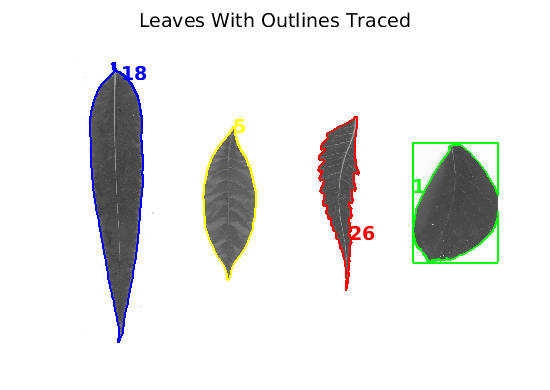
UBUNTU 17.10 IS COMING OUT SO SOON! Short post today but I will do a longer post next week focusing on the beautiful new operating system that is getting released. I am really sorry about the posting dry-spell of late. I have been immensely busy with school work and training. You could go so far as to describe my life with the following pseudocode: > location = &Alex; > self_approval = 0; > > if (location == school) || (location == judo); >     self_approval = 1; // hooray! > > else >     self_approval = 0; // GET BACK TO WORK I finally have a course at school where I get to formally learn about Artificial Intelligence. My university has graduate level courses that are about AI for electrical engineers but until this year had no undergraduate courses for ECE students. The course is looking at pattern recognition and data processing and so far it has been fantastic. AI has been an interest of mine for a while but I ...

Slashdot: News For Nerds, Stuff That Matters

Image
Several weeks ago, the professor who is supervising me for the summer and I were talking about technology. This is to be expected since he is an ECE professor and I am an ECE student. It started as a run of the mill conversation until we somehow managed to get on the topic of why my supervisor always needed to have an RSS feed on his mobile devices. He insisted on the RSS feed to have easy access to Slashdot. When my supervisor first mentioned Slashdot I wondered what it was. A quick google search and some reading showed that it is the eloquent sibling of Reddit. Not to bash Reddit too hard but it can sometimes be hard to wade through the heaping pile of garbage that can be collect in a Reddit thread. There isn't an up/down-voting system but the content is definitely of a higher quality than Reddit. You can usually tell a post is of a higher quality by the number of comments. The comment counter takes the visual place of the up-vote counter on Reddit. Slashdot may have a g...

Flying High: UAVs, FPGAs and Ubuntu Come Together

Image
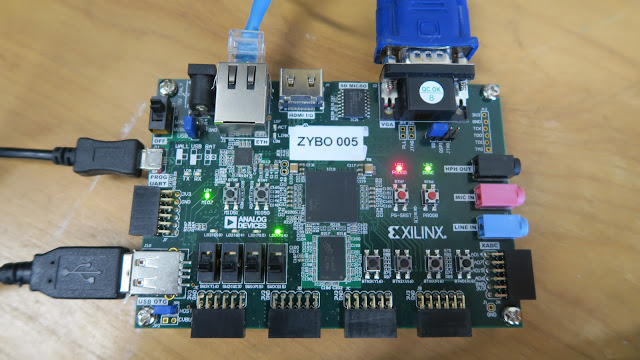
Xilinx Zybo Running Xillinux This summer I have the privilege of working with a research team of students and professors at my university. As an electrical engineering student this has me over the moon since it will be hands on experience with industry level hardware and software design. The goal of our project is hilariously simply to describe. We want to track insects using a UAV. Sweep a field, figure out where they are and then produce a report for the users. This does sound like relatively simple task but as with almost every design problem the devil is in the details. One of the grad students designed a logo for our research team. Currently the design team is comprised of two undergraduate students (one of them being me), two masters students and two professors. One professor's specialty is electromagnetics and hardware while the other leans towards signal processing and communication. I am working one the signal processing and software aspects of the project. ...

Machine Learning: Fight Smarter Not Harder

Image
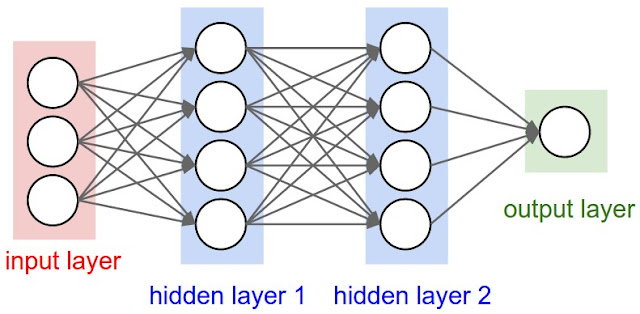
Multi-layer neural network. Brains are cool. Computers are cool. Over the past several decades people have looked at creating a computer "brain" and boy were the researchers successful. Neural networks, or as I like to call them "computer brains" have come a long way and are something I am very interested in. Being able to add abstract learning to a computer is strange. Being able to "teach" a computer has been done for the past years without a problem but for me to sit down and try to do it is mindbogglingly complex. Sadly I haven't had much free time to write this week and so I will only quickly skim the surface and direct you to a great video to talk about the neural networks that I am going to be studying. I found this guy on YouTube and think his content is great. I am following along through his tutorials. Here is a link to his video and to my playlist that I am slowly building about ECE topics that interest me. You can check the videos ...

Ubuntu and Snaps: Pros and Cons (Updated)

Image
Edit: Big thanks to the Google+ community for giving me direction to some good documentation on snap files. As a result I am updating this post as of June 2, 2017. With every major upgrade, Ubuntu usually brings in a big new feature or two. Like back in 2011 when they switched from Gnome to Unity in Natty Narwhal or when they switched from Rhythmbox to Banshee and then back to Rhythmbox (I am a hardcore music fan. Don't mess with  my audio player!). With the release of Zesty Zapus, I have noticed that Canonical seems to be pushing Snaps as their new install package. With any new linux tool, lets take a look at it! Here are some of the pros and cons of snaps in my thoughts. 1. Pro: Snaps are easy to install. I am pleased to say that this upgrade does seem like a move in the direction of making Ubuntu more accessible to the general public. One simple command in the command line and you can browse through many many snap packages. You can even download and install them from...

Zesty Zapus: Tips and Tricks for Ubuntu 17.04

Image
Last week Canonical released another beautiful OS: Ubuntu 17.04, Zesty Zapus. Sporting Unity 7, Zapus has one of the smoothest user interfaces I have used on an Ubuntu release. Though Unity and the hopes of Ubuntu smartphones and tablets has disappeared this release is still a great user experience. Here are a few things that I have been enjoying and would strongly recommend to other users.  If you are new to linux, take a look  here  to learn how to install Ubuntu on your computer! 1. Update and Upgrade One of the first things to do for both security and performance improvement will be upgrade your operating system. This will ensure that things will continue to work smoothly. Updating can be done by opening your launcher and typing in and launching the "Software Updater". Alternatively this can be done through the terminal by clicking CTRL + ALT + T and typing in the following: sudo apt-get update && sudo apt-get upgrade 2. ...

Ubuntu: From Herons to Zapuses

Image
Open source is a rather interesting concept in a modern world of pay to play and expensive software. Free Open Source Software (FOSS) serves as an oasis for the digital community to get their hands on high quality software for free. There are no expensive licences or monthly fees, simply software that works (most of the time). When I was around younger I remember my father letting me have the oldest family computer. It was an old Pentium III that would have been running Windows 95. My inherited computer had a major drawback: no operating system was installed on the hard drive. This is what brought on my first exposure to the open source community. My dad had used linux back in the 90s and had suggested we take a look at potentially installing that instead of an old version of windows. After doing some research and talking to a family friend who extensively uses linux, we settled with Ubuntu as our distro of choice. I believe that the first install was Hardy Heron (Ubuntu 8.04)....

Pining for a Pinebook

Image
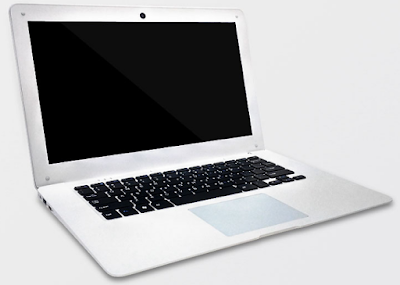
Do you know what this is? Just a regular old laptop right? I was shocked to discover this beauty a few days ago. This is a Pinebook. A Pinebook you say? What makes it so special? I am super excited about it since it is essentially a Pi-Top except cheaper with better specs. It is an incredibly affordable Open Source Notebook. What isn't to love? What is in the box? This 64-bit ARM based Open Source Notebook looks like a typical laptop but for only $89 USD or $99 USD one of these beautiful boxes can be yours. The specs for this box are mind-blowing. The cost is so little for such high performance. You probably can barely buy components for the full cost of the device. Keep in mind that the Pinebook is pretty much just a mid-range smartphone put into a laptop case but even then a smartphone with similar specs would start at around $150-200. I am baffled at how this is happening but I am ok with it. Here is what it has for specs and features: CPU: 64-Bit Quad-Core ARM...

How to Install Ubuntu and Other Linux Distros

Image
I have been a hardcore Linux fanboy for a really long time now. I think the first Linux distro I ever used was Ubuntu 8.04 (what that translates into is 8 as in 2008, 04 meaning May). I had always been pretty interested in computers and technology. My dad really understood this (he is a prof in ECE at my university) and really helped drive me forward in this field. It started off with programming animation software (Alice if I recall correctly) and eventually migrated into more complex things like micro-controllers and such. I was 12 and he gave me one of the older family desktops so that I could play with it. He had suggested that we try installing Linux on it. At the time I had absolutely no idea how to install operating systems. It was an old computer, Pentium III with 256 MB of RAM old. We didn't even have enough RAM to install Ubuntu, so we had to get get another stick of 256 MB RAM to actually install and use Ubuntu. From there on I was captivated by Linux and the world of ...